Spark SQL
Agenda
- DataFrame
- Operations on DataFrames
- Types
- Column Expressions
DataFrame
Like an RDD, a DataFrame is an immutable distributed collection of data. Unlike an RDD, data is organized into named columns, like a table in a relational database. Designed to make large data sets processing even easier, DataFrame allows developers to impose a structure onto a distributed collection of data, allowing higher-level abstraction.
DataFrame
A DataFrame can informally be thought of as an RDD consisting of pyspark.sql.Row objects and a schema.
from pyspark.sql import Row
from pyspark.sql import types as T

rdd = sc.parallelize([
  Row(name='John Doe', age='48', height=190),
  Row(name='Jane Doe', age='20', height=188),
  Row(name='John Low', age='28', height=150),
])
schema = T.StructType([
  T.StructField(name='name', dataType=T.StringType(), nullable=True),
  T.StructField(name='age', dataType=T.StringType(), nullable=True),
  T.StructField(name='height', dataType=T.StringType(), nullable=True),
])

df = spark.createDataFrame(rdd, schema)
display(df)
| name | age | height | |
|---|---|---|---|
| 0 | John Doe | 48 | 190 |
| 1 | Jane Doe | 20 | 188 |
| 2 | John Low | 28 | 150 |
DataFrame
The underlying RDD is stored as an attribute of the DataFrame.
df.rdd
MapPartitionsRDD[10] at javaToPython at NativeMethodAccessorImpl.java:0
DataFrames are immutable like RDDs, you can modify them through operations that create new, different DataFrames, with different columns.
Schemas
A schema defines the column names and types of a DataFrame. We can either let a data source define the schema (called schema-on-read) or we can define it explicitly ourselves. For ad hoc analysis, schema-on-read usually works just fine. When using Spark for production Extract, Transform, and Load (ETL), it is often a good idea to define your schemas manually, especially when working with untyped data sources like CSV and JSON because schema inference can vary depending on the type of data that you read in.
The schema is an attribute af a pyspark DataFrame as you can see below.
df.schema
StructType([StructField('name', StringType(), True), StructField('age', StringType(), True), StructField('height', StringType(), True)])
df.printSchema()
root
 |-- name: string (nullable = true)
 |-- age: string (nullable = true)
 |-- height: string (nullable = true)
Schema
A schema is a StructType made up of a number of fields, StructFields, that have a name, type, a Boolean flag which specifies whether that column can contain missing or null values, and, finally, users can optionally specify associated metadata with that column. The metadata is a way of storing information about this column (Spark uses this in its machine learning library).
Here is how to create and enforce a specific schema on a DataFrame.
from pyspark.sql import types as T

manual_schema = T.StructType([
  T.StructField("carrier", T.StringType(), True),
  T.StructField("name", T.StringType(), True, metadata={"hello":"world"}),
])
airlines = (
    spark
    .read
    .format("csv")
    .schema(manual_schema)
    .option("header", "true")
    .option("mode", "FAILFAST")
    .load("/datasets/nycflights13/airlines.csv")
)
display(airlines)
| carrier | name | |
|---|---|---|
| 0 | 9E | Endeavor Air Inc. |
| 1 | AA | American Airlines Inc. |
| 2 | AS | Alaska Airlines Inc. |
| 3 | B6 | JetBlue Airways |
| 4 | DL | Delta Air Lines Inc. |
Schema
If the types in the data (at runtime) do not match the schema, Spark can throw an error, depending on how the mode option is set.
from pyspark.sql import types as T

manual_schema = T.StructType([
    T.StructField("carrier", T.StringType(), False),
    T.StructField("name", T.ByteType(), True, metadata={"hello":"world"}),
])
airlines = (
    spark
    .read
    .format("csv")
    .schema(manual_schema)
    .option("header", "true")
    .option("mode", "FAILFAST")
    .load("/datasets/nycflights13/airlines.csv")
)
try:
    display(airlines)
except Exception as e:
    print(e)
An error occurred while calling o75.collectToPython.
: org.apache.spark.SparkException: Job aborted due to stage failure: Task 0 in stage 4.0 failed 1 times, most recent failure: Lost task 0.0 in stage 4.0 (TID 9) (172.20.10.3 executor driver): org.apache.spark.SparkException: Encountered error while reading file file:///datasets/nycflights13/airlines.csv. Details:
	at org.apache.spark.sql.errors.QueryExecutionErrors$.cannotReadFilesError(QueryExecutionErrors.scala:877)
	at org.apache.spark.sql.execution.datasources.FileScanRDD$$anon$1.nextIterator(FileScanRDD.scala:307)
	at org.apache.spark.sql.execution.datasources.FileScanRDD$$anon$1.hasNext(FileScanRDD.scala:125)
	at scala.collection.Iterator$$anon$10.hasNext(Iterator.scala:460)
	at org.apache.spark.sql.execution.SparkPlan.$anonfun$getByteArrayRdd$1(SparkPlan.scala:388)
	at org.apache.spark.rdd.RDD.$anonfun$mapPartitionsInternal$2(RDD.scala:888)
	at org.apache.spark.rdd.RDD.$anonfun$mapPartitionsInternal$2$adapted(RDD.scala:888)
	at org.apache.spark.rdd.MapPartitionsRDD.compute(MapPartitionsRDD.scala:52)
	at org.apache.spark.rdd.RDD.computeOrReadCheckpoint(RDD.scala:364)
	at org.apache.spark.rdd.RDD.iterator(RDD.scala:328)
	at org.apache.spark.scheduler.ResultTask.runTask(ResultTask.scala:92)
	at org.apache.spark.TaskContext.runTaskWithListeners(TaskContext.scala:161)
	at org.apache.spark.scheduler.Task.run(Task.scala:139)
	at org.apache.spark.executor.Executor$TaskRunner.$anonfun$run$3(Executor.scala:554)
	at org.apache.spark.util.Utils$.tryWithSafeFinally(Utils.scala:1529)
	at org.apache.spark.executor.Executor$TaskRunner.run(Executor.scala:557)
	at java.util.concurrent.ThreadPoolExecutor.runWorker(ThreadPoolExecutor.java:1149)
	at java.util.concurrent.ThreadPoolExecutor$Worker.run(ThreadPoolExecutor.java:624)
	at java.lang.Thread.run(Thread.java:748)
Caused by: org.apache.spark.SparkException: [MALFORMED_RECORD_IN_PARSING] Malformed records are detected in record parsing: [9E,null].
Parse Mode: FAILFAST. To process malformed records as null result, try setting the option 'mode' as 'PERMISSIVE'.
	at org.apache.spark.sql.errors.QueryExecutionErrors$.malformedRecordsDetectedInRecordParsingError(QueryExecutionErrors.scala:1764)
	at org.apache.spark.sql.catalyst.util.FailureSafeParser.parse(FailureSafeParser.scala:69)
	at org.apache.spark.sql.catalyst.csv.UnivocityParser$.$anonfun$parseIterator$2(UnivocityParser.scala:456)
	at scala.collection.Iterator$$anon$11.nextCur(Iterator.scala:486)
	at scala.collection.Iterator$$anon$11.hasNext(Iterator.scala:492)
	at scala.collection.Iterator$$anon$10.hasNext(Iterator.scala:460)
	at org.apache.spark.sql.execution.datasources.FileScanRDD$$anon$1.hasNext(FileScanRDD.scala:125)
	at org.apache.spark.sql.execution.datasources.FileScanRDD$$anon$1.nextIterator(FileScanRDD.scala:297)
	... 17 more
Caused by: org.apache.spark.sql.catalyst.util.BadRecordException: java.lang.NumberFormatException: For input string: "Endeavor Air Inc."
	at org.apache.spark.sql.catalyst.csv.UnivocityParser.org$apache$spark$sql$catalyst$csv$UnivocityParser$$convert(UnivocityParser.scala:365)
	at org.apache.spark.sql.catalyst.csv.UnivocityParser.$anonfun$parse$2(UnivocityParser.scala:307)
	at org.apache.spark.sql.catalyst.csv.UnivocityParser$.$anonfun$parseIterator$1(UnivocityParser.scala:452)
	at org.apache.spark.sql.catalyst.util.FailureSafeParser.parse(FailureSafeParser.scala:60)
	... 23 more
Caused by: java.lang.NumberFormatException: For input string: "Endeavor Air Inc."
	at java.lang.NumberFormatException.forInputString(NumberFormatException.java:65)
	at java.lang.Integer.parseInt(Integer.java:580)
	at java.lang.Byte.parseByte(Byte.java:149)
	at java.lang.Byte.parseByte(Byte.java:175)
	at scala.collection.immutable.StringLike.toByte(StringLike.scala:294)
	at scala.collection.immutable.StringLike.toByte$(StringLike.scala:294)
	at scala.collection.immutable.StringOps.toByte(StringOps.scala:33)
	at org.apache.spark.sql.catalyst.csv.UnivocityParser.$anonfun$makeConverter$2(UnivocityParser.scala:183)
	at org.apache.spark.sql.catalyst.csv.UnivocityParser.$anonfun$makeConverter$2$adapted(UnivocityParser.scala:183)
	at org.apache.spark.sql.catalyst.csv.UnivocityParser.nullSafeDatum(UnivocityParser.scala:291)
	at org.apache.spark.sql.catalyst.csv.UnivocityParser.$anonfun$makeConverter$1(UnivocityParser.scala:183)
	at org.apache.spark.sql.catalyst.csv.UnivocityParser.org$apache$spark$sql$catalyst$csv$UnivocityParser$$convert(UnivocityParser.scala:346)
	... 26 more

Driver stacktrace:
	at org.apache.spark.scheduler.DAGScheduler.failJobAndIndependentStages(DAGScheduler.scala:2785)
	at org.apache.spark.scheduler.DAGScheduler.$anonfun$abortStage$2(DAGScheduler.scala:2721)
	at org.apache.spark.scheduler.DAGScheduler.$anonfun$abortStage$2$adapted(DAGScheduler.scala:2720)
	at scala.collection.mutable.ResizableArray.foreach(ResizableArray.scala:62)
	at scala.collection.mutable.ResizableArray.foreach$(ResizableArray.scala:55)
	at scala.collection.mutable.ArrayBuffer.foreach(ArrayBuffer.scala:49)
	at org.apache.spark.scheduler.DAGScheduler.abortStage(DAGScheduler.scala:2720)
	at org.apache.spark.scheduler.DAGScheduler.$anonfun$handleTaskSetFailed$1(DAGScheduler.scala:1206)
	at org.apache.spark.scheduler.DAGScheduler.$anonfun$handleTaskSetFailed$1$adapted(DAGScheduler.scala:1206)
	at scala.Option.foreach(Option.scala:407)
	at org.apache.spark.scheduler.DAGScheduler.handleTaskSetFailed(DAGScheduler.scala:1206)
	at org.apache.spark.scheduler.DAGSchedulerEventProcessLoop.doOnReceive(DAGScheduler.scala:2984)
	at org.apache.spark.scheduler.DAGSchedulerEventProcessLoop.onReceive(DAGScheduler.scala:2923)
	at org.apache.spark.scheduler.DAGSchedulerEventProcessLoop.onReceive(DAGScheduler.scala:2912)
	at org.apache.spark.util.EventLoop$$anon$1.run(EventLoop.scala:49)
	at org.apache.spark.scheduler.DAGScheduler.runJob(DAGScheduler.scala:971)
	at org.apache.spark.SparkContext.runJob(SparkContext.scala:2263)
	at org.apache.spark.SparkContext.runJob(SparkContext.scala:2284)
	at org.apache.spark.SparkContext.runJob(SparkContext.scala:2303)
	at org.apache.spark.sql.execution.SparkPlan.executeTake(SparkPlan.scala:530)
	at org.apache.spark.sql.execution.SparkPlan.executeTake(SparkPlan.scala:483)
	at org.apache.spark.sql.execution.CollectLimitExec.executeCollect(limit.scala:61)
	at org.apache.spark.sql.Dataset.$anonfun$collectToPython$1(Dataset.scala:3997)
	at org.apache.spark.sql.Dataset.$anonfun$withAction$2(Dataset.scala:4167)
	at org.apache.spark.sql.execution.QueryExecution$.withInternalError(QueryExecution.scala:526)
	at org.apache.spark.sql.Dataset.$anonfun$withAction$1(Dataset.scala:4165)
	at org.apache.spark.sql.execution.SQLExecution$.$anonfun$withNewExecutionId$6(SQLExecution.scala:118)
	at org.apache.spark.sql.execution.SQLExecution$.withSQLConfPropagated(SQLExecution.scala:195)
	at org.apache.spark.sql.execution.SQLExecution$.$anonfun$withNewExecutionId$1(SQLExecution.scala:103)
	at org.apache.spark.sql.SparkSession.withActive(SparkSession.scala:827)
	at org.apache.spark.sql.execution.SQLExecution$.withNewExecutionId(SQLExecution.scala:65)
	at org.apache.spark.sql.Dataset.withAction(Dataset.scala:4165)
	at org.apache.spark.sql.Dataset.collectToPython(Dataset.scala:3994)
	at sun.reflect.NativeMethodAccessorImpl.invoke0(Native Method)
	at sun.reflect.NativeMethodAccessorImpl.invoke(NativeMethodAccessorImpl.java:62)
	at sun.reflect.DelegatingMethodAccessorImpl.invoke(DelegatingMethodAccessorImpl.java:43)
	at java.lang.reflect.Method.invoke(Method.java:498)
	at py4j.reflection.MethodInvoker.invoke(MethodInvoker.java:244)
	at py4j.reflection.ReflectionEngine.invoke(ReflectionEngine.java:374)
	at py4j.Gateway.invoke(Gateway.java:282)
	at py4j.commands.AbstractCommand.invokeMethod(AbstractCommand.java:132)
	at py4j.commands.CallCommand.execute(CallCommand.java:79)
	at py4j.ClientServerConnection.waitForCommands(ClientServerConnection.java:182)
	at py4j.ClientServerConnection.run(ClientServerConnection.java:106)
	at java.lang.Thread.run(Thread.java:748)
Caused by: org.apache.spark.SparkException: Encountered error while reading file file:///datasets/nycflights13/airlines.csv. Details:
	at org.apache.spark.sql.errors.QueryExecutionErrors$.cannotReadFilesError(QueryExecutionErrors.scala:877)
	at org.apache.spark.sql.execution.datasources.FileScanRDD$$anon$1.nextIterator(FileScanRDD.scala:307)
	at org.apache.spark.sql.execution.datasources.FileScanRDD$$anon$1.hasNext(FileScanRDD.scala:125)
	at scala.collection.Iterator$$anon$10.hasNext(Iterator.scala:460)
	at org.apache.spark.sql.execution.SparkPlan.$anonfun$getByteArrayRdd$1(SparkPlan.scala:388)
	at org.apache.spark.rdd.RDD.$anonfun$mapPartitionsInternal$2(RDD.scala:888)
	at org.apache.spark.rdd.RDD.$anonfun$mapPartitionsInternal$2$adapted(RDD.scala:888)
	at org.apache.spark.rdd.MapPartitionsRDD.compute(MapPartitionsRDD.scala:52)
	at org.apache.spark.rdd.RDD.computeOrReadCheckpoint(RDD.scala:364)
	at org.apache.spark.rdd.RDD.iterator(RDD.scala:328)
	at org.apache.spark.scheduler.ResultTask.runTask(ResultTask.scala:92)
	at org.apache.spark.TaskContext.runTaskWithListeners(TaskContext.scala:161)
	at org.apache.spark.scheduler.Task.run(Task.scala:139)
	at org.apache.spark.executor.Executor$TaskRunner.$anonfun$run$3(Executor.scala:554)
	at org.apache.spark.util.Utils$.tryWithSafeFinally(Utils.scala:1529)
	at org.apache.spark.executor.Executor$TaskRunner.run(Executor.scala:557)
	at java.util.concurrent.ThreadPoolExecutor.runWorker(ThreadPoolExecutor.java:1149)
	at java.util.concurrent.ThreadPoolExecutor$Worker.run(ThreadPoolExecutor.java:624)
	... 1 more
Caused by: org.apache.spark.SparkException: [MALFORMED_RECORD_IN_PARSING] Malformed records are detected in record parsing: [9E,null].
Parse Mode: FAILFAST. To process malformed records as null result, try setting the option 'mode' as 'PERMISSIVE'.
	at org.apache.spark.sql.errors.QueryExecutionErrors$.malformedRecordsDetectedInRecordParsingError(QueryExecutionErrors.scala:1764)
	at org.apache.spark.sql.catalyst.util.FailureSafeParser.parse(FailureSafeParser.scala:69)
	at org.apache.spark.sql.catalyst.csv.UnivocityParser$.$anonfun$parseIterator$2(UnivocityParser.scala:456)
	at scala.collection.Iterator$$anon$11.nextCur(Iterator.scala:486)
	at scala.collection.Iterator$$anon$11.hasNext(Iterator.scala:492)
	at scala.collection.Iterator$$anon$10.hasNext(Iterator.scala:460)
	at org.apache.spark.sql.execution.datasources.FileScanRDD$$anon$1.hasNext(FileScanRDD.scala:125)
	at org.apache.spark.sql.execution.datasources.FileScanRDD$$anon$1.nextIterator(FileScanRDD.scala:297)
	... 17 more
Caused by: org.apache.spark.sql.catalyst.util.BadRecordException: java.lang.NumberFormatException: For input string: "Endeavor Air Inc."
	at org.apache.spark.sql.catalyst.csv.UnivocityParser.org$apache$spark$sql$catalyst$csv$UnivocityParser$$convert(UnivocityParser.scala:365)
	at org.apache.spark.sql.catalyst.csv.UnivocityParser.$anonfun$parse$2(UnivocityParser.scala:307)
	at org.apache.spark.sql.catalyst.csv.UnivocityParser$.$anonfun$parseIterator$1(UnivocityParser.scala:452)
	at org.apache.spark.sql.catalyst.util.FailureSafeParser.parse(FailureSafeParser.scala:60)
	... 23 more
Caused by: java.lang.NumberFormatException: For input string: "Endeavor Air Inc."
	at java.lang.NumberFormatException.forInputString(NumberFormatException.java:65)
	at java.lang.Integer.parseInt(Integer.java:580)
	at java.lang.Byte.parseByte(Byte.java:149)
	at java.lang.Byte.parseByte(Byte.java:175)
	at scala.collection.immutable.StringLike.toByte(StringLike.scala:294)
	at scala.collection.immutable.StringLike.toByte$(StringLike.scala:294)
	at scala.collection.immutable.StringOps.toByte(StringOps.scala:33)
	at org.apache.spark.sql.catalyst.csv.UnivocityParser.$anonfun$makeConverter$2(UnivocityParser.scala:183)
	at org.apache.spark.sql.catalyst.csv.UnivocityParser.$anonfun$makeConverter$2$adapted(UnivocityParser.scala:183)
	at org.apache.spark.sql.catalyst.csv.UnivocityParser.nullSafeDatum(UnivocityParser.scala:291)
	at org.apache.spark.sql.catalyst.csv.UnivocityParser.$anonfun$makeConverter$1(UnivocityParser.scala:183)
	at org.apache.spark.sql.catalyst.csv.UnivocityParser.org$apache$spark$sql$catalyst$csv$UnivocityParser$$convert(UnivocityParser.scala:346)
	... 26 more
23/09/26 17:37:03 ERROR Executor: Exception in task 0.0 in stage 4.0 (TID 9)
org.apache.spark.SparkException: Encountered error while reading file file:///datasets/nycflights13/airlines.csv. Details:
	at org.apache.spark.sql.errors.QueryExecutionErrors$.cannotReadFilesError(QueryExecutionErrors.scala:877)
	at org.apache.spark.sql.execution.datasources.FileScanRDD$$anon$1.nextIterator(FileScanRDD.scala:307)
	at org.apache.spark.sql.execution.datasources.FileScanRDD$$anon$1.hasNext(FileScanRDD.scala:125)
	at scala.collection.Iterator$$anon$10.hasNext(Iterator.scala:460)
	at org.apache.spark.sql.execution.SparkPlan.$anonfun$getByteArrayRdd$1(SparkPlan.scala:388)
	at org.apache.spark.rdd.RDD.$anonfun$mapPartitionsInternal$2(RDD.scala:888)
	at org.apache.spark.rdd.RDD.$anonfun$mapPartitionsInternal$2$adapted(RDD.scala:888)
	at org.apache.spark.rdd.MapPartitionsRDD.compute(MapPartitionsRDD.scala:52)
	at org.apache.spark.rdd.RDD.computeOrReadCheckpoint(RDD.scala:364)
	at org.apache.spark.rdd.RDD.iterator(RDD.scala:328)
	at org.apache.spark.scheduler.ResultTask.runTask(ResultTask.scala:92)
	at org.apache.spark.TaskContext.runTaskWithListeners(TaskContext.scala:161)
	at org.apache.spark.scheduler.Task.run(Task.scala:139)
	at org.apache.spark.executor.Executor$TaskRunner.$anonfun$run$3(Executor.scala:554)
	at org.apache.spark.util.Utils$.tryWithSafeFinally(Utils.scala:1529)
	at org.apache.spark.executor.Executor$TaskRunner.run(Executor.scala:557)
	at java.util.concurrent.ThreadPoolExecutor.runWorker(ThreadPoolExecutor.java:1149)
	at java.util.concurrent.ThreadPoolExecutor$Worker.run(ThreadPoolExecutor.java:624)
	at java.lang.Thread.run(Thread.java:748)
Caused by: org.apache.spark.SparkException: [MALFORMED_RECORD_IN_PARSING] Malformed records are detected in record parsing: [9E,null].
Parse Mode: FAILFAST. To process malformed records as null result, try setting the option 'mode' as 'PERMISSIVE'.
	at org.apache.spark.sql.errors.QueryExecutionErrors$.malformedRecordsDetectedInRecordParsingError(QueryExecutionErrors.scala:1764)
	at org.apache.spark.sql.catalyst.util.FailureSafeParser.parse(FailureSafeParser.scala:69)
	at org.apache.spark.sql.catalyst.csv.UnivocityParser$.$anonfun$parseIterator$2(UnivocityParser.scala:456)
	at scala.collection.Iterator$$anon$11.nextCur(Iterator.scala:486)
	at scala.collection.Iterator$$anon$11.hasNext(Iterator.scala:492)
	at scala.collection.Iterator$$anon$10.hasNext(Iterator.scala:460)
	at org.apache.spark.sql.execution.datasources.FileScanRDD$$anon$1.hasNext(FileScanRDD.scala:125)
	at org.apache.spark.sql.execution.datasources.FileScanRDD$$anon$1.nextIterator(FileScanRDD.scala:297)
	... 17 more
Caused by: org.apache.spark.sql.catalyst.util.BadRecordException: java.lang.NumberFormatException: For input string: "Endeavor Air Inc."
	at org.apache.spark.sql.catalyst.csv.UnivocityParser.org$apache$spark$sql$catalyst$csv$UnivocityParser$$convert(UnivocityParser.scala:365)
	at org.apache.spark.sql.catalyst.csv.UnivocityParser.$anonfun$parse$2(UnivocityParser.scala:307)
	at org.apache.spark.sql.catalyst.csv.UnivocityParser$.$anonfun$parseIterator$1(UnivocityParser.scala:452)
	at org.apache.spark.sql.catalyst.util.FailureSafeParser.parse(FailureSafeParser.scala:60)
	... 23 more
Caused by: java.lang.NumberFormatException: For input string: "Endeavor Air Inc."
	at java.lang.NumberFormatException.forInputString(NumberFormatException.java:65)
	at java.lang.Integer.parseInt(Integer.java:580)
	at java.lang.Byte.parseByte(Byte.java:149)
	at java.lang.Byte.parseByte(Byte.java:175)
	at scala.collection.immutable.StringLike.toByte(StringLike.scala:294)
	at scala.collection.immutable.StringLike.toByte$(StringLike.scala:294)
	at scala.collection.immutable.StringOps.toByte(StringOps.scala:33)
	at org.apache.spark.sql.catalyst.csv.UnivocityParser.$anonfun$makeConverter$2(UnivocityParser.scala:183)
	at org.apache.spark.sql.catalyst.csv.UnivocityParser.$anonfun$makeConverter$2$adapted(UnivocityParser.scala:183)
	at org.apache.spark.sql.catalyst.csv.UnivocityParser.nullSafeDatum(UnivocityParser.scala:291)
	at org.apache.spark.sql.catalyst.csv.UnivocityParser.$anonfun$makeConverter$1(UnivocityParser.scala:183)
	at org.apache.spark.sql.catalyst.csv.UnivocityParser.org$apache$spark$sql$catalyst$csv$UnivocityParser$$convert(UnivocityParser.scala:346)
	... 26 more
23/09/26 17:37:03 ERROR TaskSetManager: Task 0 in stage 4.0 failed 1 times; aborting job
The SparkSession
SparkSession(sparkContext, jsparkSession=None) The entry point to programming Spark with the Dataset and DataFrame API.
The SparkSession is initialized automatically in a Databricks notebook and assigned to the variable spark.
spark
Example: Dataset
The flights dataset contains:
year,month,dayDate of departuredep_time,arr_timeActual departure and arrival times, local tz.sched_dep_time,sched_arr_timeScheduled departure and arrival times, local time-zone.dep_delay,arr_delayDeparture and arrival delays, in minutes. Negative times represent early departures/arrivals.hour,minuteTime of scheduled departure broken into hour and minutes.carrierTwo letter carrier abbreviation.tailnumPlane tail numberflightFlight numberorigin,destOrigin and destination. See airports for additional metadata.air_timeAmount of time spent in the air, in minutesdistanceDistance between airports, in milestime_hourScheduled date and hour of the flight as a POSIXct date. Along with origin, can be used to join flights data to weather data.
I/O
The SparkSession is often used to read data spark.
flights = spark.read.csv(
    '/datasets/nycflights13/flights.csv',
    header=True,
    inferSchema=True
)
display(flights)
| year | month | day | dep_time | sched_dep_time | dep_delay | arr_time | sched_arr_time | arr_delay | carrier | flight | tailnum | origin | dest | air_time | distance | hour | minute | time_hour | |
|---|---|---|---|---|---|---|---|---|---|---|---|---|---|---|---|---|---|---|---|
| 0 | 2013 | 1 | 1 | 517 | 515 | 2 | 830 | 819 | 11 | UA | 1545 | N14228 | EWR | IAH | 227 | 1400 | 5 | 15 | 2013-01-01 05:00:00 |
| 1 | 2013 | 1 | 1 | 533 | 529 | 4 | 850 | 830 | 20 | UA | 1714 | N24211 | LGA | IAH | 227 | 1416 | 5 | 29 | 2013-01-01 05:00:00 |
| 2 | 2013 | 1 | 1 | 542 | 540 | 2 | 923 | 850 | 33 | AA | 1141 | N619AA | JFK | MIA | 160 | 1089 | 5 | 40 | 2013-01-01 05:00:00 |
| 3 | 2013 | 1 | 1 | 544 | 545 | -1 | 1004 | 1022 | -18 | B6 | 725 | N804JB | JFK | BQN | 183 | 1576 | 5 | 45 | 2013-01-01 05:00:00 |
| 4 | 2013 | 1 | 1 | 554 | 600 | -6 | 812 | 837 | -25 | DL | 461 | N668DN | LGA | ATL | 116 | 762 | 6 | 0 | 2013-01-01 06:00:00 |
You can write the DataFrame to disk again after manipulations.
flights.write.csv('/tmp/flights.csv', mode='overwrite')
Types and Schema
The module pyspark.sql.types is the next most used submodule. It is used to create a schema, which is input to various functions, e.g. when initializing a DataFrame, and user defined functions (UDF).
Example: Operations used on a DataFrame
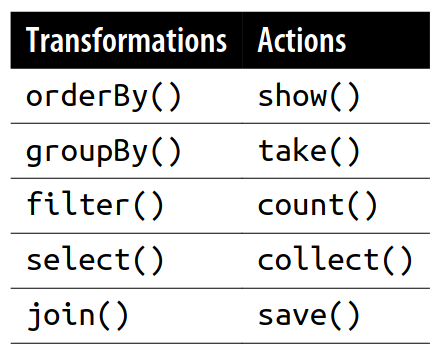
Some commenly used methods on DataFrame's include (not all).
select(*cols)Projects a set of expressions and returns a new DataFrame.withColumn(colName, col)Returns a new DataFrame by adding a column or replacing the existing column that has the same name.where(condition) / filter(condition)Filters rows using the given condition.orderBy(*cols, **kwargs)Returns a new DataFrame sorted by the specified column(s).agg(*exprs)Compute aggregates and returns the result as a DataFrame. Can be used on a groupedgroupBy(*cols)Groups the DataFrame using the specified columns, so we can run aggregation on them. DataFrame as well to do the operation by group.
By chaining these simple DataFrame methods together in a pipeline one can achieve rather complex transformations, so it makes sense to memorize these transformation methods.
Transformations: Lazy
Transformations are operations that Spark evaluates lazily. A huge advantage of the lazy evaluation scheme is that Spark can inspect your computational query and ascertain how it can optimize it.
Narrow and Wide Transformations
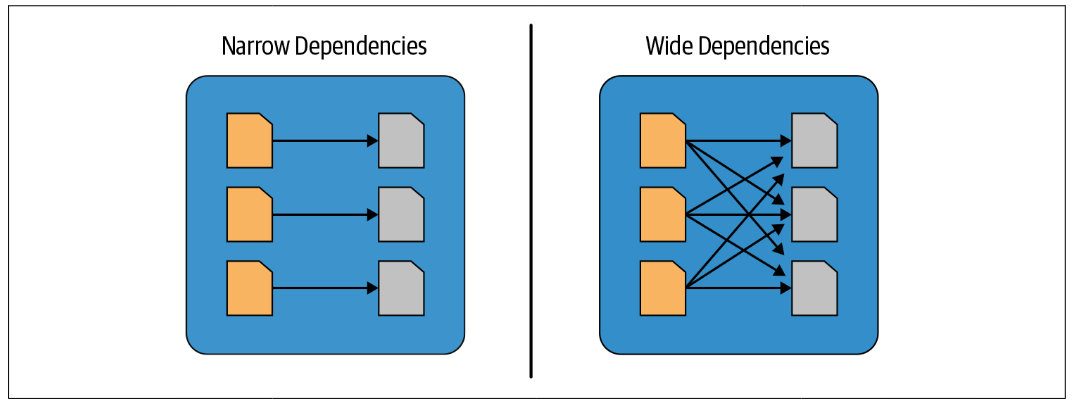
Transformations can be classified as having either narrow dependencies or wide dependencies. Any transformation where a single output partition can be computed from a single input partition is a narrow transformation.
If a single output partition cannot be computed from a single input partition then a shuffle is required. This is called a wide transformation.
Narrow and Wide Transformations
filter() and withColumn() represent narrow transformations because they can operate on a single partition and produce the resulting output partition without any exchange of data.
from pyspark.sql import functions as F

flights.filter(F.col('month').isin([9, 10, 11]))      # narrow transformation.
flights.withColumn('next_month', F.col('month') + 1)  # narrow transformation.
DataFrame[year: int, month: int, day: int, dep_time: int, sched_dep_time: int, dep_delay: int, arr_time: int, sched_arr_time: int, arr_delay: int, carrier: string, flight: int, tailnum: string, origin: string, dest: string, air_time: int, distance: int, hour: int, minute: int, time_hour: timestamp, next_month: int]
Narrow and Wide Transformations
groupBy() or orderBy() instruct Spark to perform wide transformations, where data from other partitions is read in, combined, and written to disk.
flights.groupBy('month').agg(F.count('*'))            # wide transformation.
flights.orderBy('month')                              # wide transformation.
DataFrame[year: int, month: int, day: int, dep_time: int, sched_dep_time: int, dep_delay: int, arr_time: int, sched_arr_time: int, arr_delay: int, carrier: string, flight: int, tailnum: string, origin: string, dest: string, air_time: int, distance: int, hour: int, minute: int, time_hour: timestamp]
Column Expressions
Columns in Spark are similar to columns in a spreadsheet, R dataframe, or pandas DataFrame. You can select, manipulate, and remove columns from DataFrames and these operations are represented as expressions.
There are a lot of different ways to construct and refer to columns but the two simplest ways are by using the col or column functions. To use either of these functions, you pass in a column name.
You can also refer directly to the columns of a DataFrame, this can be useful when joining two DataFrame's with the same column name.
from pyspark.sql import functions as F

F.col("someColumnName")
flights['dest']
Column<'dest'>
Column Expressions
Columns are expressions, but what is an expression? An expression is a set of transformations on one or more values in a record in a DataFrame.
(((F.col("someCol") + 5) * 200) - 6) < F.col("otherCol")
Column<'((((someCol + 5) * 200) - 6) < otherCol)'>
Column Expressions
If you want to programmatically access columns, you can use the columns property to see all columns on a DataFrame.
airlines.columns
['carrier', 'name']
where(condition) / filter(condition)
Filters rows using the given condition. To filter rows, we create an expression that evaluates to true or false. You then filter out the rows with an expression that is equal to false. The most common way to do this with DataFrames is to create either an expression as a String or build an expression by using a set of column manipulations.
Use the comparison operators: >, >=, <, <=, != (not equal), == (equal) and .eqNullSafe().
Every boolean expression must be True in order for a row to be included in the output. For other types of combinations you'll need to use the Boolean operators: & (and), | (or), ~ (not), ^ (XOR).
display(
    flights
    .withColumn(
        'mean_speed',
        F.col('distance') / (F.col('air_time') / 60)
    )
    .where(
        F.col('mean_speed') < 400
    )
)
| year | month | day | dep_time | sched_dep_time | dep_delay | arr_time | sched_arr_time | arr_delay | carrier | flight | tailnum | origin | dest | air_time | distance | hour | minute | time_hour | mean_speed | |
|---|---|---|---|---|---|---|---|---|---|---|---|---|---|---|---|---|---|---|---|---|
| 0 | 2013 | 1 | 1 | 517 | 515 | 2 | 830 | 819 | 11 | UA | 1545 | N14228 | EWR | IAH | 227 | 1400 | 5 | 15 | 2013-01-01 05:00:00 | 370.044053 |
| 1 | 2013 | 1 | 1 | 533 | 529 | 4 | 850 | 830 | 20 | UA | 1714 | N24211 | LGA | IAH | 227 | 1416 | 5 | 29 | 2013-01-01 05:00:00 | 374.273128 |
| 2 | 2013 | 1 | 1 | 554 | 600 | -6 | 812 | 837 | -25 | DL | 461 | N668DN | LGA | ATL | 116 | 762 | 6 | 0 | 2013-01-01 06:00:00 | 394.137931 |
| 3 | 2013 | 1 | 1 | 554 | 558 | -4 | 740 | 728 | 12 | UA | 1696 | N39463 | EWR | ORD | 150 | 719 | 5 | 58 | 2013-01-01 05:00:00 | 287.600000 |
| 4 | 2013 | 1 | 1 | 557 | 600 | -3 | 709 | 723 | -14 | EV | 5708 | N829AS | LGA | IAD | 53 | 229 | 6 | 0 | 2013-01-01 06:00:00 | 259.245283 |
where(condition) / filter(condition)
Instinctually, you might want to put multiple filters into the same expression. Although this is possible, it is not always useful, because Spark automatically performs all filtering operations at the same time regardless of the filter ordering. This means that if you want to specify multiple AND filters, just chain them sequentially and let Spark handle the rest.
display(
    flights
    .where(
        F.col('month') > 6
    )
    .where(
        F.col('month') < 8
    )
)
| year | month | day | dep_time | sched_dep_time | dep_delay | arr_time | sched_arr_time | arr_delay | carrier | flight | tailnum | origin | dest | air_time | distance | hour | minute | time_hour | |
|---|---|---|---|---|---|---|---|---|---|---|---|---|---|---|---|---|---|---|---|
| 0 | 2013 | 7 | 1 | 1 | 2029 | 212 | 236 | 2359 | 157 | B6 | 915 | N653JB | JFK | SFO | 315 | 2586 | 20 | 29 | 2013-07-01 20:00:00 |
| 1 | 2013 | 7 | 1 | 2 | 2359 | 3 | 344 | 344 | 0 | B6 | 1503 | N805JB | JFK | SJU | 200 | 1598 | 23 | 59 | 2013-07-01 23:00:00 |
| 2 | 2013 | 7 | 1 | 29 | 2245 | 104 | 151 | 1 | 110 | B6 | 234 | N348JB | JFK | BTV | 66 | 266 | 22 | 45 | 2013-07-01 22:00:00 |
| 3 | 2013 | 7 | 1 | 43 | 2130 | 193 | 322 | 14 | 188 | B6 | 1371 | N794JB | LGA | FLL | 143 | 1076 | 21 | 30 | 2013-07-01 21:00:00 |
| 4 | 2013 | 7 | 1 | 44 | 2150 | 174 | 300 | 100 | 120 | AA | 185 | N324AA | JFK | LAX | 297 | 2475 | 21 | 50 | 2013-07-01 21:00:00 |
Missing Values
When filtering Null values are evaluated to False, this can give surprising results.
display(
  flights
  .where(
    F.lit(None) == F.lit(None)
  )
)
| year | month | day | dep_time | sched_dep_time | dep_delay | arr_time | sched_arr_time | arr_delay | carrier | flight | tailnum | origin | dest | air_time | distance | hour | minute | time_hour |
|---|
Missing Values
The above returns an empty DataFrame because it evaluates to Null.
display(
    flights
    .select(
        # Boolean expressions returns Null.
        (F.lit(None) == F.lit(None)).alias('null_equal_null'),
        (F.lit(None) == F.lit(10)).alias('null_equal_number'),
        (F.lit(None) > F.lit(10)).alias('null_gt_number'),

        # Arithmetic expression returns NaN.
        (F.lit(None) + F.lit(10)).alias('null_add_number'),
        (F.lit(None) * F.lit(10)).alias('null_multiply_number'),
        (F.lit(None) / F.lit(10)).alias('null_division_number'),
    )
)
| null_equal_null | null_equal_number | null_gt_number | null_add_number | null_multiply_number | null_division_number | |
|---|---|---|---|---|---|---|
| 0 | None | None | None | NaN | NaN | NaN |
| 1 | None | None | None | NaN | NaN | NaN |
| 2 | None | None | None | NaN | NaN | NaN |
| 3 | None | None | None | NaN | NaN | NaN |
| 4 | None | None | None | NaN | NaN | NaN |
Missing Values
The Column functions isNotNull(), isNull() can be used to filter Null values away, replace them or whatever is the best action in the given analysis. A handy function in the pyspark.sql.functions module is coalesce(), it takes the first value in a series of column expressions which is not Null, analogous to the SQL function.
display(
      flights
      .select(
          F.lit(None).isNotNull().alias('isNotNull'),
          F.lit(None).isNull().alias('isNull'),
          F.coalesce(F.lit(None), F.lit(True)).alias('coalesce'),
          F.lit(None).eqNullSafe(F.lit(None)).alias('eqNullSafe'),
      )
)
| isNotNull | isNull | coalesce | eqNullSafe | |
|---|---|---|---|---|
| 0 | False | True | True | True |
| 1 | False | True | True | True |
| 2 | False | True | True | True |
| 3 | False | True | True | True |
| 4 | False | True | True | True |
Exercise 4.1.
select(*cols) and selectExpr(*cols)
select() and selectExpr() allow you to do the DataFrame equivalent of SQL queries on a table of data.
display(
    flights
    .select(
        (F.col('distance') / (F.col('air_time') / 60)).alias('mean_speed'),
        (F.col('arr_delay') - F.col('dep_delay')).alias('gain'),
    )
)
| mean_speed | gain | |
|---|---|---|
| 0 | 370.044053 | 9 |
| 1 | 374.273128 | 16 |
| 2 | 408.375000 | 31 |
| 3 | 516.721311 | -17 |
| 4 | 394.137931 | -19 |
Dropping columns
You likely already noticed that we can drop columns using select() e.g. select all but the variables you want to drop. However, there is also a dedicated method called drop().
display(
    flights
    .select(
        'year',
        'month',
        'day'
    )
    .drop(
        'year'
    )
)
| month | day | |
|---|---|---|
| 0 | 1 | 1 |
| 1 | 1 | 1 |
| 2 | 1 | 1 |
| 3 | 1 | 1 |
| 4 | 1 | 1 |
withColumn(colName, col)
The withColumn() adds a new column, which is a function of existing columns. It takes two arguments: the column name and the expression that will create the value for that given row in the DataFrame.
display(
    flights
    .withColumn(
        'mean_speed',
        F.col('distance') / (F.col('air_time') / 60)
    )
)
| year | month | day | dep_time | sched_dep_time | dep_delay | arr_time | sched_arr_time | arr_delay | carrier | flight | tailnum | origin | dest | air_time | distance | hour | minute | time_hour | mean_speed | |
|---|---|---|---|---|---|---|---|---|---|---|---|---|---|---|---|---|---|---|---|---|
| 0 | 2013 | 1 | 1 | 517 | 515 | 2 | 830 | 819 | 11 | UA | 1545 | N14228 | EWR | IAH | 227 | 1400 | 5 | 15 | 2013-01-01 05:00:00 | 370.044053 |
| 1 | 2013 | 1 | 1 | 533 | 529 | 4 | 850 | 830 | 20 | UA | 1714 | N24211 | LGA | IAH | 227 | 1416 | 5 | 29 | 2013-01-01 05:00:00 | 374.273128 |
| 2 | 2013 | 1 | 1 | 542 | 540 | 2 | 923 | 850 | 33 | AA | 1141 | N619AA | JFK | MIA | 160 | 1089 | 5 | 40 | 2013-01-01 05:00:00 | 408.375000 |
| 3 | 2013 | 1 | 1 | 544 | 545 | -1 | 1004 | 1022 | -18 | B6 | 725 | N804JB | JFK | BQN | 183 | 1576 | 5 | 45 | 2013-01-01 05:00:00 | 516.721311 |
| 4 | 2013 | 1 | 1 | 554 | 600 | -6 | 812 | 837 | -25 | DL | 461 | N668DN | LGA | ATL | 116 | 762 | 6 | 0 | 2013-01-01 06:00:00 | 394.137931 |
Renaming columns
You can rename a column with the withColumn() function, e.g. .withColumn(foo, foo), but it is better to use the dedicated function ẁithColumnRenamed() for this.
display(
    flights
    .withColumnRenamed(
        'year',
        'dep_year'
    )
)
| dep_year | month | day | dep_time | sched_dep_time | dep_delay | arr_time | sched_arr_time | arr_delay | carrier | flight | tailnum | origin | dest | air_time | distance | hour | minute | time_hour | |
|---|---|---|---|---|---|---|---|---|---|---|---|---|---|---|---|---|---|---|---|
| 0 | 2013 | 1 | 1 | 517 | 515 | 2 | 830 | 819 | 11 | UA | 1545 | N14228 | EWR | IAH | 227 | 1400 | 5 | 15 | 2013-01-01 05:00:00 |
| 1 | 2013 | 1 | 1 | 533 | 529 | 4 | 850 | 830 | 20 | UA | 1714 | N24211 | LGA | IAH | 227 | 1416 | 5 | 29 | 2013-01-01 05:00:00 |
| 2 | 2013 | 1 | 1 | 542 | 540 | 2 | 923 | 850 | 33 | AA | 1141 | N619AA | JFK | MIA | 160 | 1089 | 5 | 40 | 2013-01-01 05:00:00 |
| 3 | 2013 | 1 | 1 | 544 | 545 | -1 | 1004 | 1022 | -18 | B6 | 725 | N804JB | JFK | BQN | 183 | 1576 | 5 | 45 | 2013-01-01 05:00:00 |
| 4 | 2013 | 1 | 1 | 554 | 600 | -6 | 812 | 837 | -25 | DL | 461 | N668DN | LGA | ATL | 116 | 762 | 6 | 0 | 2013-01-01 06:00:00 |
sort(*cols, **kwargs) and orderBy(*cols, **kwargs)
Arrange rows with sort() and orderBy(), they work equivalently. They accept both column expressions and strings as well as multiple columns. The default is to sort in ascending order.
Returns a new DataFrame sorted by the specified column(s).
display(
    flights
    .withColumn(
        'mean_speed',
        F.col('distance') / (F.col('air_time') / 60)
    )
    .orderBy(F.col('mean_speed'))
)
| year | month | day | dep_time | sched_dep_time | dep_delay | arr_time | sched_arr_time | arr_delay | carrier | flight | tailnum | origin | dest | air_time | distance | hour | minute | time_hour | mean_speed | |
|---|---|---|---|---|---|---|---|---|---|---|---|---|---|---|---|---|---|---|---|---|
| 0 | 2013 | 9 | 25 | NaN | 1755 | NaN | NaN | 1932 | NaN | EV | 5287 | N722EV | LGA | MSN | NaN | 812 | 17 | 55 | 2013-09-25 17:00:00 | NaN |
| 1 | 2013 | 4 | 27 | NaN | 1345 | NaN | NaN | 1700 | NaN | AA | 117 | N335AA | JFK | LAX | NaN | 2475 | 13 | 45 | 2013-04-27 13:00:00 | NaN |
| 2 | 2013 | 12 | 12 | NaN | 700 | NaN | NaN | 855 | NaN | EV | 4099 | N14558 | EWR | STL | NaN | 872 | 7 | 0 | 2013-12-12 07:00:00 | NaN |
| 3 | 2013 | 4 | 27 | NaN | 800 | NaN | NaN | 1135 | NaN | AA | 59 | N328AA | JFK | SFO | NaN | 2586 | 8 | 0 | 2013-04-27 08:00:00 | NaN |
| 4 | 2013 | 6 | 17 | 1751.0 | 1629 | 82.0 | 2118.0 | 1823 | NaN | EV | 5818 | N14573 | EWR | MEM | NaN | 946 | 16 | 29 | 2013-06-17 16:00:00 | NaN |
sort(*cols, **kwargs) and orderBy(*cols, **kwargs)
To sort descending you need to specify this explicitely.
display(
    flights
    .withColumn(
        'mean_speed',
        F.col('distance') / (F.col('air_time') / 60)
    )
    .orderBy(F.col('mean_speed').desc())
)
| year | month | day | dep_time | sched_dep_time | dep_delay | arr_time | sched_arr_time | arr_delay | carrier | flight | tailnum | origin | dest | air_time | distance | hour | minute | time_hour | mean_speed | |
|---|---|---|---|---|---|---|---|---|---|---|---|---|---|---|---|---|---|---|---|---|
| 0 | 2013 | 5 | 25 | 1709 | 1700 | 9 | 1923 | 1937 | -14 | DL | 1499 | N666DN | LGA | ATL | 65 | 762 | 17 | 0 | 2013-05-25 17:00:00 | 703.384615 |
| 1 | 2013 | 7 | 2 | 1558 | 1513 | 45 | 1745 | 1719 | 26 | EV | 4667 | N17196 | EWR | MSP | 93 | 1008 | 15 | 13 | 2013-07-02 15:00:00 | 650.322581 |
| 2 | 2013 | 5 | 13 | 2040 | 2025 | 15 | 2225 | 2226 | -1 | EV | 4292 | N14568 | EWR | GSP | 55 | 594 | 20 | 25 | 2013-05-13 20:00:00 | 648.000000 |
| 3 | 2013 | 3 | 23 | 1914 | 1910 | 4 | 2045 | 2043 | 2 | EV | 3805 | N12567 | EWR | BNA | 70 | 748 | 19 | 10 | 2013-03-23 19:00:00 | 641.142857 |
| 4 | 2013 | 1 | 12 | 1559 | 1600 | -1 | 1849 | 1917 | -28 | DL | 1902 | N956DL | LGA | PBI | 105 | 1035 | 16 | 0 | 2013-01-12 16:00:00 | 591.428571 |
Exercise 4.2.
agg(*exprs)
agg() can condense multiple records to a single record. The agg() method can be used in conjuction with groupBy() which changes the scope of each function from operating on the entire DataFrame to operating on it group-by-group. This is useful to compute aggregate statistics of the records in the DataFrame, to answer questions like: What is the average month a flight took place, average year, max year, a list of all years, a list of all months.
display(
    flights
    .agg(
        F.mean('month'),
        F.mean('year'),
        F.max('year'),
        F.collect_set('year'),
        F.collect_set('month'),
    )
)
| avg(month) | avg(year) | max(year) | collect_set(year) | collect_set(month) | |
|---|---|---|---|---|---|
| 0 | 6.54851 | 2013.0 | 2013 | [2013] | [12, 9, 1, 5, 2, 6, 3, 10, 7, 4, 11, 8] |
Aggregation Functions
Aggregation functions are also available in the pyspark.sql.functions module. It is good practice to give this module an alias and refer to it that way.
from pyspark.sql import functions as F
F.count(col)
The first function worth going over is count, except in this example it will perform as a transformation instead of an action. In this case, we can do one of two things: specify a specific column to count, or all the columns by using count() or count(1) to represent that we want to count every row as the literal one, when performing a count(), Spark will count null values (including rows containing all nulls). However, when counting an individual column, Spark will not count the null values.
flights.agg(F.count('*').alias("row_count"))
DataFrame[row_count: bigint]
Now call an action:
display(flights.agg(F.count('*').alias("row_count")))
| row_count | |
|---|---|
| 0 | 336776 |
F.countDistinct(col, *cols)
Sometimes, the total number is not relevant; rather, it’s the number of unique groups that you want. To get this number, you can use the countDistinct function. This is a bit more relevant for individual column.
display(flights.agg(F.countDistinct("year")))
| count(year) | |
|---|---|
| 0 | 1 |
F.min(col) and F.max(col)
To extract the minimum and maximum values from a DataFrame, use the min and max functions
display(flights.agg(F.min('month'), F.max('month')))
| min(month) | max(month) | |
|---|---|---|
| 0 | 1 | 12 |
F.sum(col)
Another simple task is to add all the values in a row using the sum function
display(flights.agg(F.sum("arr_delay"), F.mean("arr_delay")))
| sum(arr_delay) | avg(arr_delay) | |
|---|---|---|
| 0 | 2257174 | 6.895377 |
Aggregating to Complex Types
In Spark, you can perform aggregations not just of numerical values using formulas, you can also perform them on complex types. For example, we can collect a list of values present in a given column or only the unique values by collecting to a set.
You can use this to carry out some more programmatic access later on in the pipeline or pass the entire collection in a user-defined function (UDF).
flights.agg(F.collect_set("tailnum"), F.collect_list("tailnum"))
DataFrame[collect_set(tailnum): array<string>, collect_list(tailnum): array<string>]
Grouping with Expressions
As we saw earlier, counting is a bit of a special case because it exists as a method. For this, usually we prefer to use the count function. Rather than passing that function as an expression into a select statement, we specify it as within agg. This makes it possible for you to pass-in arbitrary expressions that just need to have some aggregation specified. You can even do things like alias a column after transforming it for later use in your data flow.
display(
    flights
    .groupBy('origin')
    .agg(
        F.count('*').alias('count'),
        F.mean('distance').alias('mean_distance'),
        F.mean('arr_delay').alias('mean_delay'),
    )
    .orderBy('count')
)
| origin | count | mean_distance | mean_delay | |
|---|---|---|---|---|
| 0 | LGA | 104662 | 779.835671 | 5.783488 |
| 1 | JFK | 111279 | 1266.249077 | 5.551481 |
| 2 | EWR | 120835 | 1056.742790 | 9.107055 |
Exercise 4.3.
Relational Data
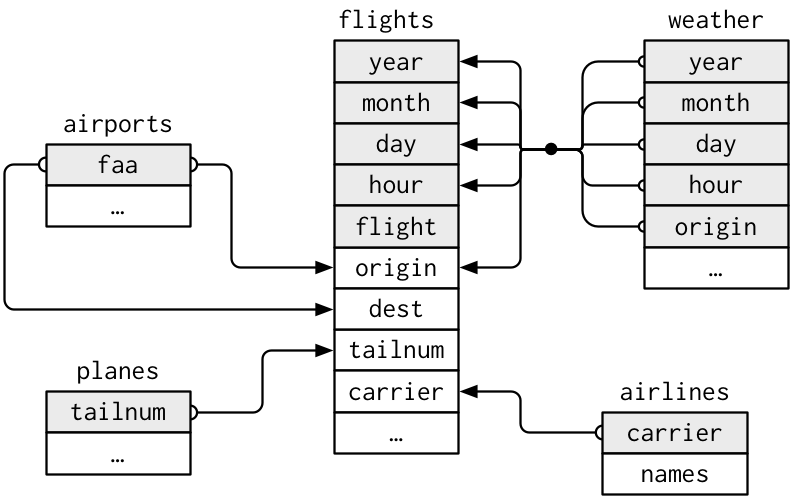
Typically you have many tables of data, and you must combine them. Collectively, multiple tables of data are called relational data because it is the relations, not just the individual datasets, that are important..
Relational Data
The variables used to connect each pair of tables are called keys. A key is a variable (or set of variables) that uniquely identifies an observation.
There are two types of keys:
A primary key uniquely identifies an observation in its own table.
A foreign key uniquely identifies an observation in another table.
Relational Data
As an example if one wish to investigate the type of planes for each carrier one could do a left join on tailnum.
planes = spark.read.csv('/datasets/nycflights13/planes.csv', header=True)
display(
    flights
    .join(
        planes,
        on='tailnum',
        how='left'
    )
    .select(
        'carrier',
        'type'
    )
)
| carrier | type | |
|---|---|---|
| 0 | UA | Fixed wing multi engine |
| 1 | UA | Fixed wing multi engine |
| 2 | AA | Fixed wing multi engine |
| 3 | B6 | Fixed wing multi engine |
| 4 | DL | Fixed wing multi engine |
Relational Data
One can use a .alias(col) to reference columns in a particular DataFrame.
planes = spark.read.csv('/datasets/nycflights13/planes.csv', header=True)
display(
    flights.alias('flights')
    .join(
        planes.alias('planes'),
        on='tailnum',
        how='left'
    )
    .select(
        F.col('flights.year').alias('flights_year'),
        F.col('planes.year').alias('planes_year'),
        'carrier',
        'type'
    )
)
| flights_year | planes_year | carrier | type | |
|---|---|---|---|---|
| 0 | 2013 | 1999 | UA | Fixed wing multi engine |
| 1 | 2013 | 1998 | UA | Fixed wing multi engine |
| 2 | 2013 | 1990 | AA | Fixed wing multi engine |
| 3 | 2013 | 2012 | B6 | Fixed wing multi engine |
| 4 | 2013 | 1991 | DL | Fixed wing multi engine |
Joins
join(other, on=None, how=None) Joins with another DataFrame, using the given join expression.
Parameters
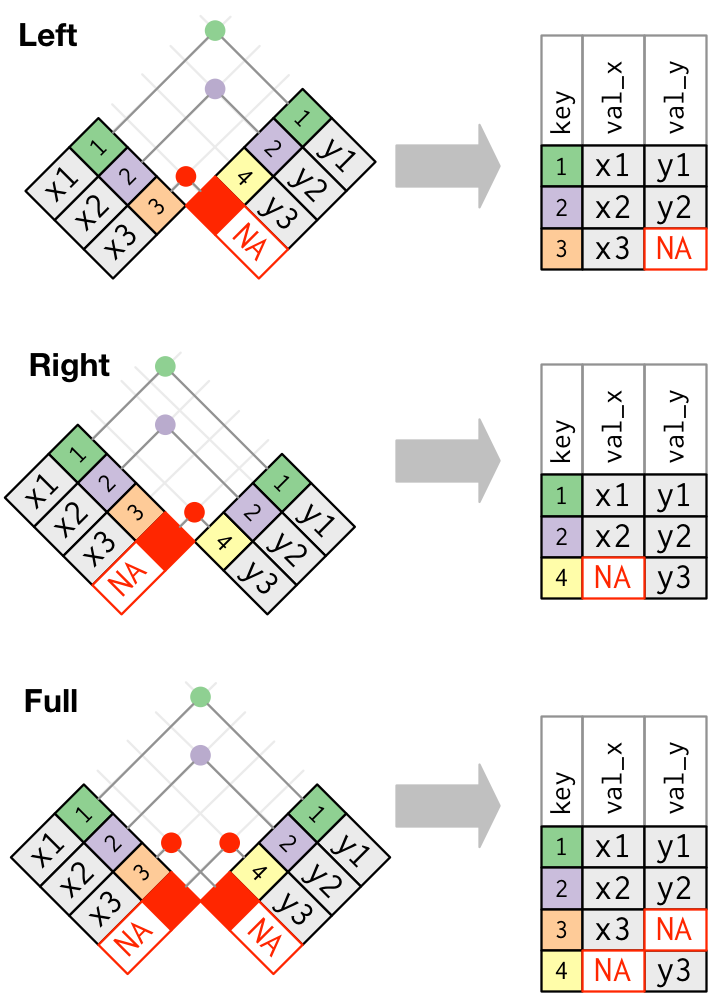
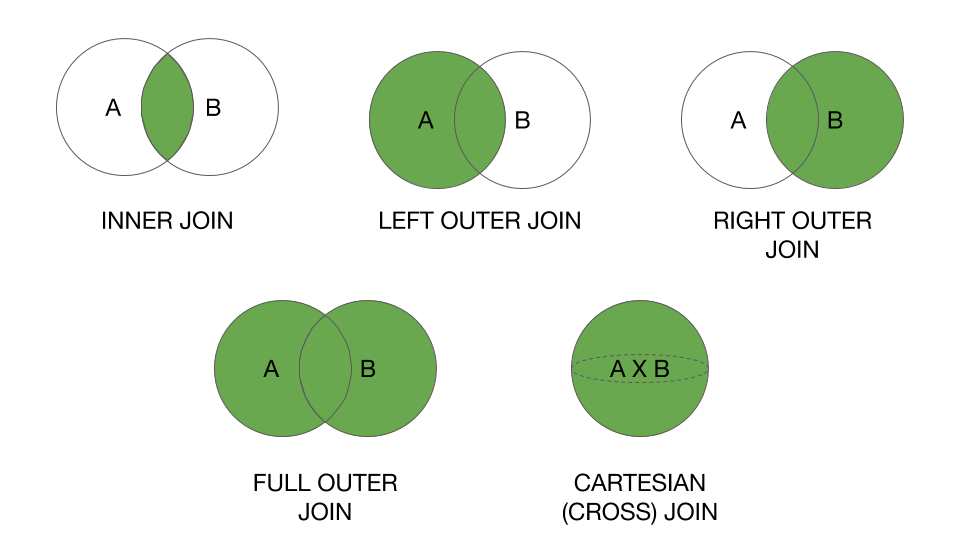
otherRight side of the joinona string for the join column name, a list of column names, a join expression (Column), or a list of Columns. If on is a string or a list of strings indicating the name of the join column(s), the column(s) must exist on both sides, and this performs an equi-join.howstr, default inner. Must be one of: inner, cross, outer, full, full_outer, left, left_outer, right, right_outer, left_semi, and left_anti.
Inner and left are the two most used join types, left_anti is useful for filtering.
A cross join seems ideally for some mathematical computations, but is almost never useful in practice, it is too computationally expensive because the number of rows explodes, if there are m rows in the first dataframe and n in the other then the resulting dataframe will have m x n rows.
Repartition
.repartition(numPartitions, *cols) changes the number of partitions.
Hash Partitioning
The partitioner used by the .repartition(numPartitions, *cols) function is hash partitioning. Hash partitioning roughly assign each row to the partition:
F.hash(*cols) % numPartitions
If you repartition by a column it is roughly equivalent to indexing the data by the column in a relational database.
df = flights.repartition(3, F.col('month'))
print("Number of Partitions", df.rdd.getNumPartitions())
Number of Partitions 3
Repartition
display(
  df
  .repartition(200, 'month')
  .withColumn(
    'partition',
    F.spark_partition_id()
  )
  .groupBy(
    'month',
    'partition'
  )
  .count()
  .orderBy('month')
)
| month | partition | count | |
|---|---|---|---|
| 0 | 1 | 43 | 27004 |
| 1 | 2 | 174 | 24951 |
| 2 | 3 | 51 | 28834 |
| 3 | 4 | 102 | 28330 |
| 4 | 5 | 66 | 28796 |
Repartition
Assume we have a lot of observations in month 9, this is called data skew. Data skew is a condition in which a table’s data is unevenly distributed among partitions in the cluster. Data skew can severely downgrade performance of queries, especially those with joins. Joins between big tables require shuffling data and the skew can lead to an extreme imbalance of work in the cluster.
Repartition
display(
  flights
  .withColumn(
    'month',
    F.when(
      F.col('month') <= 9,
      F.lit(9)
    )
    .otherwise(F.col('month'))
  )
  .repartition(200, 'month')
  .withColumn(
    'partition',
    F.spark_partition_id()
  )
  .groupBy(
    'month',
    'partition'
  )
  .count()
  .orderBy('month')
)
| month | partition | count | |
|---|---|---|---|
| 0 | 9 | 89 | 252484 |
| 1 | 10 | 122 | 28889 |
| 2 | 11 | 163 | 27268 |
| 3 | 12 | 24 | 28135 |
Repartition - Recommendations
I recommend you use:
- parquet files (a binary file format, use
spark.read.parquetanddf.write.parquet) - Aim of a file size when writing to disk of around 1GB
- File size over 128MB to avoid the small file problem
- Use repartition keys that are uniformly distributed.
Example: User Defined Functions (UDF)
With user defined functions you can distribute an arbitrary Python function to the executors and do some calculation in parrellel, it is more restricted compared to the lower level rdd.map(), in that you have to specify the output datatypes and you can't return whatever, but it works directly on DataFrames. It works like a map and not on groups, to do stuff on groups you have to use a UDAF, either a pandas UDAF or create one in Scale.
It is highly recommended to avoid UDFs in all situations, as they are dramatically less performant than native PySpark. In most situations, logic that seems to necessitate a UDF can be refactored to use only native PySpark functions (pyspark.sql.functions).
from pyspark.sql import functions as F
from pyspark.sql import types as T

def square(x):
    return float(x) ** 2

udf_square = F.udf(square, T.DoubleType())

display(
    flights
    .select(
        F.col('arr_delay'),
        udf_square('arr_delay').alias('arr_delay_squared')
    )
)
| arr_delay | arr_delay_squared | |
|---|---|---|
| 0 | 11 | 121.0 |
| 1 | 20 | 400.0 |
| 2 | 33 | 1089.0 |
| 3 | -18 | 324.0 |
| 4 | -25 | 625.0 |
Exercise 4.4.
Example: Dataset
The online_retail dataset contains:
This is a transnational data set which contains all the transactions occurring between 01/12/2010 and 09/12/2011 for a UK-based and registered non-store online retail.The company mainly sells unique all-occasion gifts. Many customers of the company are wholesalers.
InvoiceNoInvoice number. Nominal, a 6-digit integral number uniquely assigned to each transaction. If this code starts with letter 'c', it indicates a cancellation.StockCodeProduct (item) code. Nominal, a 5-digit integral number uniquely assigned to each distinct product.DescriptionProduct (item) name. Nominal.QuantityThe quantities of each product (item) per transaction. Numeric.InvoiceDateInvice Date and time. Numeric, the day and time when each transaction was generated.UnitPriceUnit price. Numeric, Product price per unit in sterling.CustomerIDCustomer number. Nominal, a 5-digit integral number uniquely assigned to each customer.CountryCountry name. Nominal, the name of the country where each customer resides.
Exercise 4.5.
Window Functions
You can also use window functions to carry out some unique aggregations by either computing some aggregation on a specific “window” of data, which you define by using a reference to the current data. This window specification determines which rows will be passed in to this function. Now this is a bit abstract and probably similar to a standard group-by, so let’s differentiate them a bit more.
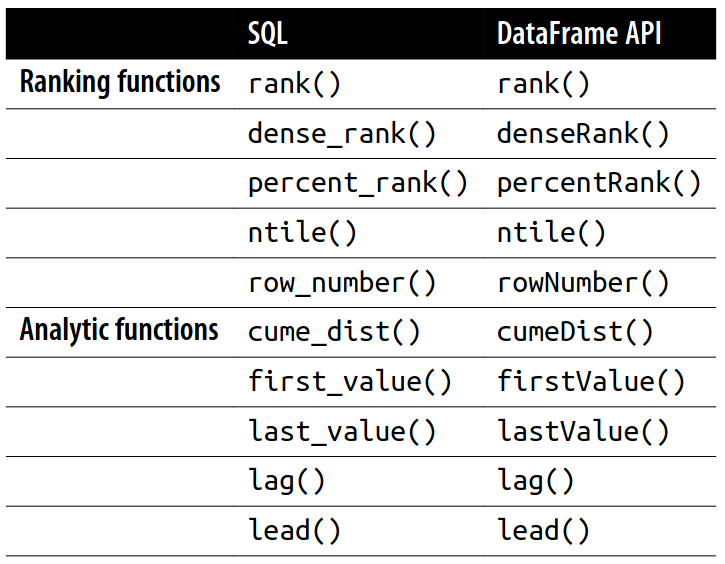
A group-by takes data, and every row can go only into one grouping. A window function calculates a return value for every input row of a table based on a group of rows, called a frame. Each row can fall into one or more frames. A common use case is to take a look at a rolling average of some value for which each row represents one day. If you were to do this, each row would end up in seven different frames. We cover defining frames a little later, but for your reference, Spark supports three kinds of window functions: ranking functions, analytic functions, and aggregate functions.
A Window object has 4 method calls
partitionBy(*cols): Describes how we will be breaking up our group.orderBy(*cols): Determines the ordering within a given partition.rowsBetween(start, end): States which rows will be included in the frame based on its reference to the current input row. For example, “0” means “current row”, while “-1” means the row before the current row, and “5” means the fifth row after the current row. Stated in another way: the row_number based on the ordering has to be between [current + start, current + end] for the row to be included in the calculation.rangeBetween(start, end): States which rows will be included in the frame based on its reference to the value of the current input row. Because of this definition, when a RANGE frame is used, only a single ordering expression is allowed. For example, “0” means “current row”, while “-1” means one off before the current row, and “5” means the five off after the current row. Stated in another way: the value of the row in the ordering has to be between [current + start, current + end] for the row to be included in the calculation.
It is recommended to use Window.unboundedPreceding, Window.unboundedFollowing, and Window.currentRow to specify special boundary values.